
Charging on the E55C network
Use your usual charging card or compatible app, your WatPass subscription, or a pay-as-you-go bank card payment to charge on the E55C network. Choose the access method that suits you.
The essentials
- Bring your charging card, use a compatible app or pay as you go by bank card.
- The price depends on your payment method. Check the tariff that applies before starting, with your provider or on the payment page.
- For our AC charge points with a Type 2 socket, bring a suitable charging cable for your vehicle.
Need to pay by bank card?
Find your station and the number shown on the charge point, then follow its payment page. The price is shown before confirmation.
Four steps to charge
Go to the charge point
Find the socket and connect your Type 2 cable to your car first.
Unlock the socket
Present your charging card, start in your app or authorise a pay-as-you-go payment. Follow the charge point and access service instructions.
Connect your vehicle
After presenting your card or starting the session in the interface, connect the cable to the charge point. Check on your car that charging has started.
Finish and free the space
Unlock and unplug at the car first to release the cable at the charge point. Alternatively, present the same charging card or stop in the app or bank card payment web page. Use the tracking email to reopen that page. Collect your cable and free the parking space.
A Type 2 cable and a way to access the network
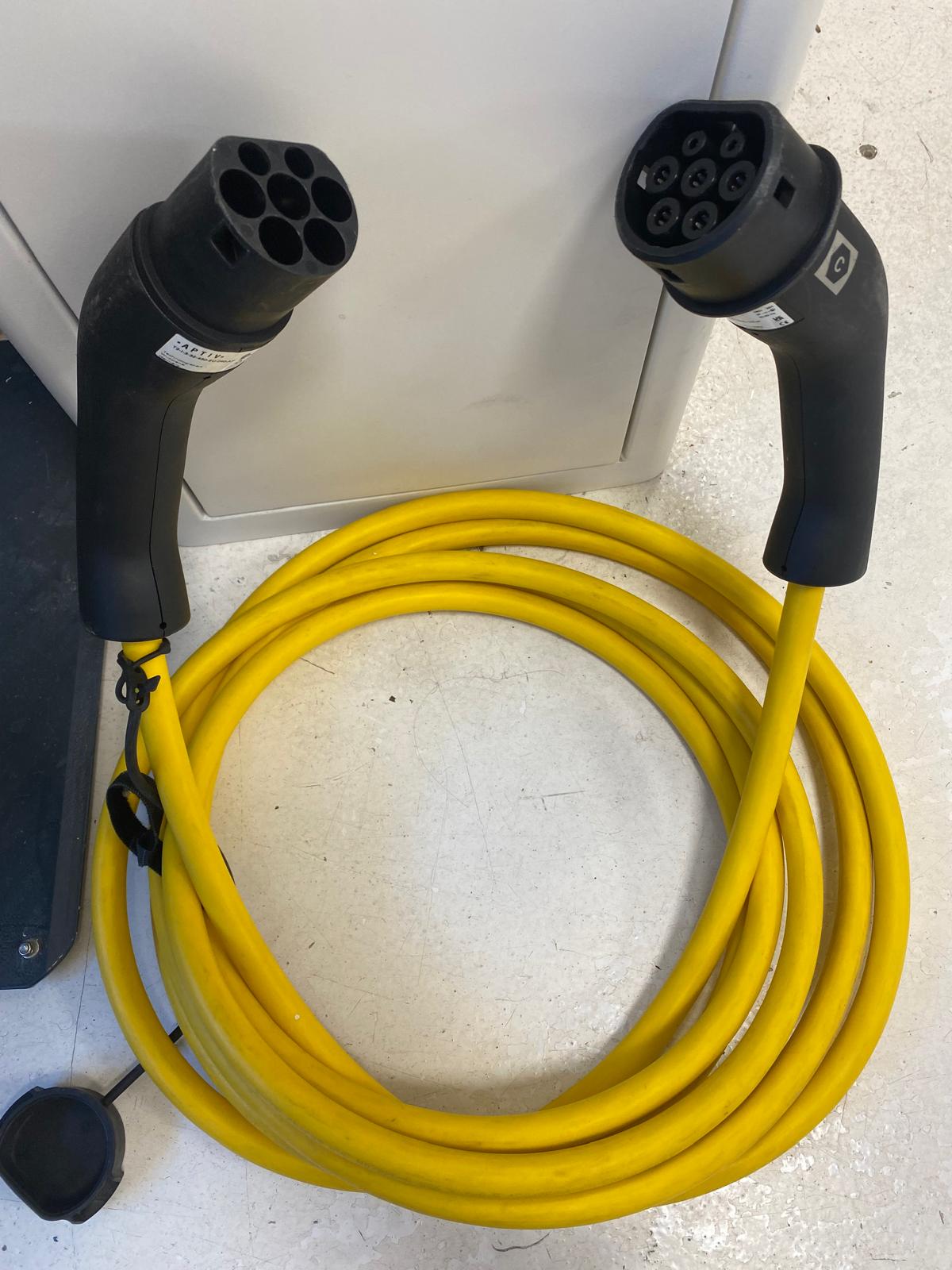
For our AC charge points with Type 2 sockets, bring your cable, often supplied with the car. Check compatibility in your vehicle documentation or with its manufacturer.
Your usual charging card or app
Your existing subscription may give you access to the network. Check compatibility and prices with your mobility provider or search for the station in its app. Order a card from a compatible provider or with WatPass (in French).
WatPass for regular charging
The WatPass app also lets you start charging directly on our network. Check the plans and subscription terms to choose an offer that suits your use.
Pay as you go when you need it
If you have no compatible card or app, pay by bank card on your phone without creating an account. An internet connection is required to open the payment page.
Find a station before your journey
Our network map (in French) and payment map show station locations. They do not show whether sockets are free or occupied in real time. Check your mobility app if it provides this information; availability can change before you arrive.
AC and DC: understanding charging power
AC: alternating current
At our Type 2 socket charge points, you use your own cable. The car’s on-board charger converts the electricity for the battery. The vehicle has a maximum AC charging power.
DC: direct current
At a rapid DC charge point, use its attached cable with a connector compatible with your vehicle. Conversion takes place in the charge point. The car has a separate DC power limit.
The power shown on a charge point is a maximum capacity, not a guaranteed input. A 22 kW AC charge point cannot exceed your car’s AC limit: if it accepts at most 7 kW AC, it remains limited to that level, even if it can accept 150 kW at a rapid DC charge point.
Think of filling a bottle: even under a waterfall, its neck limits the water flowing in. Your vehicle’s capacity plays that role when charging. The cable, charge point, battery condition and charging conditions may further reduce actual power. Find your model’s AC and DC limits in its documentation.
Follow charging from your vehicle
Your car controls its charging. Its display is the first place to check that the battery is charging, the power received and the estimated time remaining. Depending on the model and available services, the manufacturer’s app may also show vehicle status on your phone.
If charging does not start, check whether delayed charging or a charge limit has been set in the car. At the end of the session, unlock and unplug at the vehicle before removing the cable from the charge point. If you used a charging card, you can also present it again to stop.
An occupied space or a locked cable?
A parked vehicle is not plugged in
You can contact the local municipal police to report parking that prevents access to charging. If necessary, let us know too, with the town, location and charge point number.
The cable is still locked in the charge point
First check that it has been unplugged at the car after stopping charging and unlocking the vehicle’s socket. You can also present the same card used to start. If the cable remains locked, do not force it: call +33 9 75 89 15 01 with the charge point number and location.
Our cable disconnection guide (in French) provides further help.
Your questions about network access
Does my charging card or app work on your network?
Check with your mobility provider or find the station in its app. The provider can confirm access and the applicable tariff. Our provider contact guide (in French) can help identify the right contact.
How do I get a charging card or use WatPass?
Order a card from a compatible provider or explore WatPass (in French). The WatPass app also starts charging directly; check the offer terms.
Do I need a subscription?
No. Use a compatible offer with or without a subscription, or pay as you go by bank card.
How do I check the price before starting?
With a charging card, consult your provider’s prices: they may not be shown on the charge point. With an app, check the applicable tariff in the app. For pay-as-you-go bank card charging, the price is shown on the payment page before confirmation.
Can my plug-in hybrid use your charge points?
Check with the manufacturer or your model’s documentation for compatible sockets, cables and charging powers. The manufacturer can confirm the right equipment for your vehicle.
Who can help with an invoice or a fault?
For card and app charging, your provider handles prices, accounts and invoices. For WatPass, contact the WatPass team. For an E55C charge point fault or a pay-as-you-go session, contact our team and tell us how you accessed the service.
Need help at the charge point?
Have the town and charge point number ready so our team can help.